> ## Documentation Index
> Fetch the complete documentation index at: https://docs.goshippo.com/llms.txt
> Use this file to discover all available pages before exploring further.
# Generate your first label
> Create your first shipping label with the Shippo API using a two-step rate-then-purchase flow or a single API call.
**Note**
If you would prefer to learn how to create your first shipping label using Postman, see our guide to create your [first shipping label using Postman](/docs/Guides_general/generate_shipping_label_postman).
Use the Shippo API to programmatically create shipping labels from any supported carrier. Follow this guide to learn how to create your first label. This guide uses Shippo API objects, to learn more about these read our [API objects guide](/docs/API_Concepts/api-objects).
**Note**
Before starting this guide, follow the [Authentication guide](/docs/Guides_general/authentication) to generate your API Token. In these guides, wherever you see ``, replace it with you own token.
When learning about and testing the Shippo API, we recommend using the [test token](/docs/Guides_general/testing). Using your test token means all the calls you make to the Shippo API are free.
## Introduction
There are two ways to create shipping labels with the Shippo API
1. [Create a label with two API calls](#create-a-label-with-two-api-calls)
If you don't know which carrier and service you want to use, use the two API call method. This retrieves all the available rates for your shipment. You can then choose the rate that works best for you before purchasing it.
2. [Create a label with one API call](#create-a-label-with-one-api-call)
If you already know which carrier and service you want to use, you can create a label with a single API call directly.
## Create a label with two API calls
To retrieve all available rates and create a shipping label based on one of the rates, you need to follow two simple steps:
1. Create the `shipment` object, consisting of two `address` objects (address from and address to) and at least one `parcels` object (blue objects below). The Shipment response contains the list of available Rates and their associated object IDs.
2. Create the `transaction` object. You pass your chosen `rates` object (green object below) to the transaction call. Calling the transaction endpoint purchases your label.

 ### Create a Shipment object

 To create a [Shipment object](/api-reference/shipments/list-all-shipments), call the shipment endpoint `https://api.goshippo.com/shipments/`.
At a minimum, a shipment requires a `address_from`, `address_to`, and `parcels`.
**Note**
All US addresses are automatically validated. For more information see our [Address Validation guide](/docs/Addresses/AddressValidation).
**Request:**
```shell title="cURL" theme={null}
curl https://api.goshippo.com/shipments/ \
-H "Authorization: ShippoToken " \
-H "Content-Type: application/json" \
-d '{
"address_from":{
"name":"Mr. Hippo",
"street1":"215 Clayton St.",
"city":"San Francisco",
"state":"CA",
"zip":"94117",
"country":"US"
},
"address_to":{
"name":"Mrs. Hippo",
"street1":"965 Mission St.",
"city":"San Francisco",
"state":"CA",
"zip":"94105",
"country":"US"
},
"parcels":[{
"length":"5",
"width":"5",
"height":"5",
"distance_unit":"in",
"weight":"2",
"mass_unit":"lb"
}],
"async": false
}'
```
```Python title="Python" theme={null}
import shippo
from shippo.models import components
shippo_sdk = shippo.Shippo(api_key_header="")
address_from = components.AddressCreateRequest(
name="Shawn Ippotle",
street1="215 Clayton St.",
city="San Francisco",
state="CA",
zip="94117",
country="US"
)
address_to = components.AddressCreateRequest(
name="Mr Hippo",
street1="Broadway 1",
city="New York",
state="NY",
zip="10007",
country="US"
)
parcel = components.ParcelCreateRequest(
length="5",
width="5",
height="5",
distance_unit=components.DistanceUnitEnum.IN,
weight="2",
mass_unit=components.WeightUnitEnum.LB
)
shipment = shippo_sdk.shipments.create(
components.ShipmentCreateRequest(
address_from=address_from,
address_to=address_to,
parcels=[parcel],
async_=False
)
)
```
```PHP theme={null}
require_once('lib/Shippo.php');
Shippo::setApiKey("");
$fromAddress = array(
'name' => 'Shawn Ippotle',
'street1' => '215 Clayton St.',
'city' => 'San Francisco',
'state' => 'CA',
'zip' => '94117',
'country' => 'US'
);
$toAddress = array(
'name' => 'Mr Hippo"',
'street1' => 'Broadway 1',
'city' => 'New York',
'state' => 'NY',
'zip' => '10007',
'country' => 'US',
'phone' => '+1 555 341 9393'
);
$parcel = array(
'length'=> '5',
'width'=> '5',
'height'=> '5',
'distance_unit'=> 'in',
'weight'=> '2',
'mass_unit'=> 'lb',
);
$shipment = Shippo_Shipment::create( array(
'address_from'=> $fromAddress,
'address_to'=> $toAddress,
'parcels'=> array($parcel),
'async'=> false
)
);
```
```typescript title="TypeScript" theme={null}
const shippo = new Shippo({apiKeyHeader: ''});
const addressFrom: AddressCreateRequest = {
name: "Shawn Ippotle",
street1: "215 Clayton St.",
city: "San Francisco",
state: "CA",
zip: "94117",
country: "US"
};
const addressTo: AddressCreateRequest = {
name: "Mr Hippo",
street1: "Broadway 1",
city: "New York",
state: "NY",
zip: "10007",
country: "US",
};
const parcel: ParcelCreateRequest = {
length: "5",
width: "5",
height: "5",
distanceUnit: DistanceUnitEnum.In,
weight: "2",
massUnit: WeightUnitEnum.Lb
};
const parcel2: ParcelCreateRequest = {
length: "10",
width: "10",
height: "10",
distanceUnit: DistanceUnitEnum.In,
weight: "2",
massUnit: WeightUnitEnum.Lb
};
const shipment = await shippo.shipments.create({
addressFrom: addressFrom,
addressTo: addressTo,
parcels: [parcel],
async: false
});
```
```Java title="Java" theme={null}
Shippo.setApiKey('');
// To Address
HashMap addressToMap = new HashMap();
addressToMap.put("name", "Mr Hippo");
addressToMap.put("company", "Shippo");
addressToMap.put("street1", "215 Clayton St.");
addressToMap.put("city", "San Francisco");
addressToMap.put("state", "CA");
addressToMap.put("zip", "94117");
addressToMap.put("country", "US");
// From Address
HashMap addressFromMap = new HashMap();
addressFromMap.put("name", "Ms Hippo");
addressFromMap.put("company", "San Diego Zoo");
addressFromMap.put("street1", "2920 Zoo Drive");
addressFromMap.put("city", "San Diego");
addressFromMap.put("state", "CA");
addressFromMap.put("zip", "92101");
addressFromMap.put("country", "US");
// Parcel
HashMap parcelMap = new HashMap();
parcelMap.put("length", "5");
parcelMap.put("width", "5");
parcelMap.put("height", "5");
parcelMap.put("distance_unit", "in");
parcelMap.put("weight", "2");
parcelMap.put("mass_unit", "lb");
// Shipment
HashMap shipmentMap = new HashMap();
shipmentMap.put("address_to", addressToMap);
shipmentMap.put("address_from", addressFromMap);
shipmentMap.put("parcels", parcelMap);
shipmentMap.put("async", false);
Shipment shipment = Shipment.create(shipmentMap);
```
```cs title="C#" theme={null}
using Shippo;
using Shippo.Models.Components;
ShippoSDK sdk = new ShippoSDK(apiKeyHeader: "");
AddressFrom addressFrom = AddressFrom.CreateAddressCreateRequest(
new AddressCreateRequest()
{
Name = "Shawn Ippotle",
Street1 = "215 Clayton St.",
City = "San Francisco",
State = "CA",
Zip = "94117",
Country = "US",
}
);
AddressTo addressTo = AddressTo.CreateAddressCreateRequest(
new AddressCreateRequest()
{
Name = "Mr Hippo",
Street1 = "Broadway 1",
City = "New York",
State = "NY",
Zip = "10007",
Country = "US",
}
);
Shippo.Models.Components.Parcels parcel = Shippo.Models.Components.Parcels.CreateParcelCreateRequest(
new ParcelCreateRequest()
{
Length = "5",
Width = "5",
Height = "5",
DistanceUnit = DistanceUnitEnum.In,
Weight = "2",
MassUnit = WeightUnitEnum.Lb,
}
);
Shipment shipment = await sdk.Shipments.CreateAsync(
new ShipmentCreateRequest()
{
AddressFrom = addressFrom,
AddressTo = addressTo,
Parcels = new List() { parcel },
Async = false,
}
);
```
The response includes the `object_id` for the `shipment`, `address_from`,`address_to`, and `parcels` as well as `rates`. These `rates` are the available shipping options for your shipment. Review the returned rates to find the one that works best for your shipment.
**Response:**
```json theme={null}
{
"carrier_accounts": [],
"object_created": "2022-12-15T11:32:41.707Z",
"object_updated": "2022-12-15T11:32:41.845Z",
"object_id": "76ca5cbfd24f4b2d96f38ea6834985be",
"object_owner": "shippotle@shippo.com",
"status": "SUCCESS",
"address_from": {
"object_id": "e0d64d09edf846d0bd94dda91b299be9",
"is_complete": true,
"name": "Mr. Hippo",
"company": "",
"street_no": "",
"street1": "215 Clayton St.",
"validation_results": {},
"street2": "",
"street3": "",
"city": "San Francisco",
"state": "CA",
"zip": "94117",
"country": "US",
"phone": "",
"email": "",
"is_residential": null,
"test": true
},
"address_to": {
"object_id": "b2d9219521be4637b5d1baeb70022c33",
"is_complete": true,
"name": "Mrs. Hippo",
"company": "",
"street_no": "",
"street1": "965 Mission St.",
"validation_results": {},
"street2": "",
"street3": "",
"city": "San Francisco",
"state": "CA",
"zip": "94105",
"country": "US",
"phone": "",
"email": "",
"is_residential": null,
"test": true
},
"parcels": [
{
"object_state": "VALID",
"object_created": "2022-12-15T11:32:41.675Z",
"object_updated": "2022-12-15T11:32:41.741Z",
"object_id": "8c119bb117934dfea19eac1e90230fa5",
"object_owner": "shippotle@shippo.com",
"template": null,
"extra": {},
"length": "5.0000",
"width": "5.0000",
"height": "5.0000",
"distance_unit": "in",
"weight": "2.0000",
"mass_unit": "lb",
"value_amount": null,
"value_currency": null,
"metadata": "",
"line_items": [],
"test": true
}
],
"shipment_date": "2022-12-15T11:32:41.845Z",
"address_return": {
"object_id": "e0d64d09edf846d0bd94dda91b299be9",
"is_complete": true,
"name": "Mr. Hippo",
"company": "",
"street_no": "",
"street1": "215 Clayton St.",
"validation_results": {},
"street2": "",
"street3": "",
"city": "San Francisco",
"state": "CA",
"zip": "94117",
"country": "US",
"phone": "",
"email": "",
"is_residential": null,
"test": true
},
"alternate_address_to": null,
"customs_declaration": null,
"extra": {},
"rates": [
{
"object_created": "2022-12-15T11:32:42.044Z",
"object_id": "eab0f0c5689347439a9b87f2380710e5",
"object_owner": "shippotle@shippo.com",
"shipment": "76ca5cbfd24f4b2d96f38ea6834985be",
"attributes": [ ],
"amount": "24.30",
"currency": "USD",
"amount_local": "24.30",
"currency_local": "USD",
"provider": "USPS",
"provider_image_75": "https://shippo-static.s3.amazonaws.com/providers/75/USPS.png",
"provider_image_200": "https://shippo-static.s3.amazonaws.com/providers/200/USPS.png",
"servicelevel": {},
"estimated_days": 2,
"arrives_by": null,
"duration_terms": "Overnight delivery to most U.S. locations.",
"messages": [ ],
"carrier_account": "b19e750708384303ac19ca693fe037ce",
"test": true,
"zone": "1"
},
...
],
"metadata": "",
"test": true,
"order": null
}
],
"carrier_accounts": [],
"metadata": "Customer ID 123456",
"messages": []
}
```
### Create a Transaction object
To create a [Shipment object](/api-reference/shipments/list-all-shipments), call the shipment endpoint `https://api.goshippo.com/shipments/`.
At a minimum, a shipment requires a `address_from`, `address_to`, and `parcels`.
**Note**
All US addresses are automatically validated. For more information see our [Address Validation guide](/docs/Addresses/AddressValidation).
**Request:**
```shell title="cURL" theme={null}
curl https://api.goshippo.com/shipments/ \
-H "Authorization: ShippoToken " \
-H "Content-Type: application/json" \
-d '{
"address_from":{
"name":"Mr. Hippo",
"street1":"215 Clayton St.",
"city":"San Francisco",
"state":"CA",
"zip":"94117",
"country":"US"
},
"address_to":{
"name":"Mrs. Hippo",
"street1":"965 Mission St.",
"city":"San Francisco",
"state":"CA",
"zip":"94105",
"country":"US"
},
"parcels":[{
"length":"5",
"width":"5",
"height":"5",
"distance_unit":"in",
"weight":"2",
"mass_unit":"lb"
}],
"async": false
}'
```
```Python title="Python" theme={null}
import shippo
from shippo.models import components
shippo_sdk = shippo.Shippo(api_key_header="")
address_from = components.AddressCreateRequest(
name="Shawn Ippotle",
street1="215 Clayton St.",
city="San Francisco",
state="CA",
zip="94117",
country="US"
)
address_to = components.AddressCreateRequest(
name="Mr Hippo",
street1="Broadway 1",
city="New York",
state="NY",
zip="10007",
country="US"
)
parcel = components.ParcelCreateRequest(
length="5",
width="5",
height="5",
distance_unit=components.DistanceUnitEnum.IN,
weight="2",
mass_unit=components.WeightUnitEnum.LB
)
shipment = shippo_sdk.shipments.create(
components.ShipmentCreateRequest(
address_from=address_from,
address_to=address_to,
parcels=[parcel],
async_=False
)
)
```
```PHP theme={null}
require_once('lib/Shippo.php');
Shippo::setApiKey("");
$fromAddress = array(
'name' => 'Shawn Ippotle',
'street1' => '215 Clayton St.',
'city' => 'San Francisco',
'state' => 'CA',
'zip' => '94117',
'country' => 'US'
);
$toAddress = array(
'name' => 'Mr Hippo"',
'street1' => 'Broadway 1',
'city' => 'New York',
'state' => 'NY',
'zip' => '10007',
'country' => 'US',
'phone' => '+1 555 341 9393'
);
$parcel = array(
'length'=> '5',
'width'=> '5',
'height'=> '5',
'distance_unit'=> 'in',
'weight'=> '2',
'mass_unit'=> 'lb',
);
$shipment = Shippo_Shipment::create( array(
'address_from'=> $fromAddress,
'address_to'=> $toAddress,
'parcels'=> array($parcel),
'async'=> false
)
);
```
```typescript title="TypeScript" theme={null}
const shippo = new Shippo({apiKeyHeader: ''});
const addressFrom: AddressCreateRequest = {
name: "Shawn Ippotle",
street1: "215 Clayton St.",
city: "San Francisco",
state: "CA",
zip: "94117",
country: "US"
};
const addressTo: AddressCreateRequest = {
name: "Mr Hippo",
street1: "Broadway 1",
city: "New York",
state: "NY",
zip: "10007",
country: "US",
};
const parcel: ParcelCreateRequest = {
length: "5",
width: "5",
height: "5",
distanceUnit: DistanceUnitEnum.In,
weight: "2",
massUnit: WeightUnitEnum.Lb
};
const parcel2: ParcelCreateRequest = {
length: "10",
width: "10",
height: "10",
distanceUnit: DistanceUnitEnum.In,
weight: "2",
massUnit: WeightUnitEnum.Lb
};
const shipment = await shippo.shipments.create({
addressFrom: addressFrom,
addressTo: addressTo,
parcels: [parcel],
async: false
});
```
```Java title="Java" theme={null}
Shippo.setApiKey('');
// To Address
HashMap addressToMap = new HashMap();
addressToMap.put("name", "Mr Hippo");
addressToMap.put("company", "Shippo");
addressToMap.put("street1", "215 Clayton St.");
addressToMap.put("city", "San Francisco");
addressToMap.put("state", "CA");
addressToMap.put("zip", "94117");
addressToMap.put("country", "US");
// From Address
HashMap addressFromMap = new HashMap();
addressFromMap.put("name", "Ms Hippo");
addressFromMap.put("company", "San Diego Zoo");
addressFromMap.put("street1", "2920 Zoo Drive");
addressFromMap.put("city", "San Diego");
addressFromMap.put("state", "CA");
addressFromMap.put("zip", "92101");
addressFromMap.put("country", "US");
// Parcel
HashMap parcelMap = new HashMap();
parcelMap.put("length", "5");
parcelMap.put("width", "5");
parcelMap.put("height", "5");
parcelMap.put("distance_unit", "in");
parcelMap.put("weight", "2");
parcelMap.put("mass_unit", "lb");
// Shipment
HashMap shipmentMap = new HashMap();
shipmentMap.put("address_to", addressToMap);
shipmentMap.put("address_from", addressFromMap);
shipmentMap.put("parcels", parcelMap);
shipmentMap.put("async", false);
Shipment shipment = Shipment.create(shipmentMap);
```
```cs title="C#" theme={null}
using Shippo;
using Shippo.Models.Components;
ShippoSDK sdk = new ShippoSDK(apiKeyHeader: "");
AddressFrom addressFrom = AddressFrom.CreateAddressCreateRequest(
new AddressCreateRequest()
{
Name = "Shawn Ippotle",
Street1 = "215 Clayton St.",
City = "San Francisco",
State = "CA",
Zip = "94117",
Country = "US",
}
);
AddressTo addressTo = AddressTo.CreateAddressCreateRequest(
new AddressCreateRequest()
{
Name = "Mr Hippo",
Street1 = "Broadway 1",
City = "New York",
State = "NY",
Zip = "10007",
Country = "US",
}
);
Shippo.Models.Components.Parcels parcel = Shippo.Models.Components.Parcels.CreateParcelCreateRequest(
new ParcelCreateRequest()
{
Length = "5",
Width = "5",
Height = "5",
DistanceUnit = DistanceUnitEnum.In,
Weight = "2",
MassUnit = WeightUnitEnum.Lb,
}
);
Shipment shipment = await sdk.Shipments.CreateAsync(
new ShipmentCreateRequest()
{
AddressFrom = addressFrom,
AddressTo = addressTo,
Parcels = new List() { parcel },
Async = false,
}
);
```
The response includes the `object_id` for the `shipment`, `address_from`,`address_to`, and `parcels` as well as `rates`. These `rates` are the available shipping options for your shipment. Review the returned rates to find the one that works best for your shipment.
**Response:**
```json theme={null}
{
"carrier_accounts": [],
"object_created": "2022-12-15T11:32:41.707Z",
"object_updated": "2022-12-15T11:32:41.845Z",
"object_id": "76ca5cbfd24f4b2d96f38ea6834985be",
"object_owner": "shippotle@shippo.com",
"status": "SUCCESS",
"address_from": {
"object_id": "e0d64d09edf846d0bd94dda91b299be9",
"is_complete": true,
"name": "Mr. Hippo",
"company": "",
"street_no": "",
"street1": "215 Clayton St.",
"validation_results": {},
"street2": "",
"street3": "",
"city": "San Francisco",
"state": "CA",
"zip": "94117",
"country": "US",
"phone": "",
"email": "",
"is_residential": null,
"test": true
},
"address_to": {
"object_id": "b2d9219521be4637b5d1baeb70022c33",
"is_complete": true,
"name": "Mrs. Hippo",
"company": "",
"street_no": "",
"street1": "965 Mission St.",
"validation_results": {},
"street2": "",
"street3": "",
"city": "San Francisco",
"state": "CA",
"zip": "94105",
"country": "US",
"phone": "",
"email": "",
"is_residential": null,
"test": true
},
"parcels": [
{
"object_state": "VALID",
"object_created": "2022-12-15T11:32:41.675Z",
"object_updated": "2022-12-15T11:32:41.741Z",
"object_id": "8c119bb117934dfea19eac1e90230fa5",
"object_owner": "shippotle@shippo.com",
"template": null,
"extra": {},
"length": "5.0000",
"width": "5.0000",
"height": "5.0000",
"distance_unit": "in",
"weight": "2.0000",
"mass_unit": "lb",
"value_amount": null,
"value_currency": null,
"metadata": "",
"line_items": [],
"test": true
}
],
"shipment_date": "2022-12-15T11:32:41.845Z",
"address_return": {
"object_id": "e0d64d09edf846d0bd94dda91b299be9",
"is_complete": true,
"name": "Mr. Hippo",
"company": "",
"street_no": "",
"street1": "215 Clayton St.",
"validation_results": {},
"street2": "",
"street3": "",
"city": "San Francisco",
"state": "CA",
"zip": "94117",
"country": "US",
"phone": "",
"email": "",
"is_residential": null,
"test": true
},
"alternate_address_to": null,
"customs_declaration": null,
"extra": {},
"rates": [
{
"object_created": "2022-12-15T11:32:42.044Z",
"object_id": "eab0f0c5689347439a9b87f2380710e5",
"object_owner": "shippotle@shippo.com",
"shipment": "76ca5cbfd24f4b2d96f38ea6834985be",
"attributes": [ ],
"amount": "24.30",
"currency": "USD",
"amount_local": "24.30",
"currency_local": "USD",
"provider": "USPS",
"provider_image_75": "https://shippo-static.s3.amazonaws.com/providers/75/USPS.png",
"provider_image_200": "https://shippo-static.s3.amazonaws.com/providers/200/USPS.png",
"servicelevel": {},
"estimated_days": 2,
"arrives_by": null,
"duration_terms": "Overnight delivery to most U.S. locations.",
"messages": [ ],
"carrier_account": "b19e750708384303ac19ca693fe037ce",
"test": true,
"zone": "1"
},
...
],
"metadata": "",
"test": true,
"order": null
}
],
"carrier_accounts": [],
"metadata": "Customer ID 123456",
"messages": []
}
```
### Create a Transaction object

 Calling the transactions endpoint `https://api.goshippo.com/transactions`, creates a `transaction` [object](/api-reference/transactions/list-all-shipping-labels) and purchases your shipping label. Use the `object_id` of the `rates` you have chosen from your `shipment`. If your `shipment` has more than one `rates`, select the `object_id` of the rate that works best for you.
You can send an optional `label_file_type` in the transaction call. If you don’t specify this value, the API will use to the default file format, which you can set on the [settings page](https://apps.goshippo.com/settings/account).
**Request:**
```shell title="cURL" theme={null}
curl https://api.goshippo.com/transactions \
-H "Authorization: ShippoToken " \
-d rate="eab0f0c5689347439a9b87f2380710e5"
-d label_file_type="PDF"
-d async=false
```
```Python title="Python" theme={null}
# Get the first rate in the rates results.
# Customize this based on your business logic.
rate = shipment.rates[0]
# Purchase the desired rate.
transaction = shippo_sdk.transactions.create(
components.TransactionCreateRequest(
rate=rate.object_id,
label_file_type=components.LabelFileTypeEnum.PDF,
async_=False
)
)
# Retrieve label url and tracking number or error message
if transaction.status == "SUCCESS":
print(transaction.label_url)
print(transaction.tracking_number)
else:
print(transaction.messages)
```
```PHP title="PHP" theme={null}
// Get the first rate in the rates results.
// Customize this based on your business logic.
$rate = $shipment["rates"][0];
// Purchase the desired rate.
$transaction = Shippo_Transaction::create( array(
'rate' => $rate["object_id"],
'label_file_type' => "PDF",
'async' => false ) );
// Retrieve label url and tracking number or error message
if ($transaction["status"] == "SUCCESS"){
echo( $transaction["label_url"] );
echo("\n");
echo( $transaction["tracking_number"] );
}else {
echo( $transaction["messages"] );
}
```
```typescript title="TypeScript" theme={null}
// Get the first rate in the rates results.
// Customize this based on your business logic.
const rate = shipment.rates[0];
// Purchase the desired rate.
const transaction = await shippo.transactions.create({
rate: rate?.objectId,
labelFileType: LabelFileTypeEnum.Pdf,
async: false
});
```
```Java title="Java" theme={null}
// Get the first rate in the rates results.
// Customize this based on your own business logic
Rate rate = rates.get(0);
Map transactionParameters = new HashMap();
transactionParameters.put("rate", rate.getObjectId());
transactionParameters.put("async", false);
Transaction transaction = Transaction.create(transactionParameters);
if (transaction.getStatus().equals("SUCCESS")) {
System.out.println(String.format("Label url : %s", transaction.getLabelUrl()));
System.out.println(String.format("Tracking number : %s", transaction.getTrackingNumber()));
} else {
System.out.println(String.format("An Error has occured while generating you label. Messages : %s", transaction.getMessages()));
}
```
```cs title="C#" theme={null}
// Get the first rate in the rates results.
// Customize this based on your business logic.
Rate rate = shipment.Rates[0];
Transaction transaction = await sdk.Transactions.CreateAsync(
CreateTransactionRequestBody.CreateTransactionCreateRequest(
new TransactionCreateRequest()
{
Rate = rate.ObjectId,
LabelFileType = LabelFileTypeEnum.Pdf,
Async = false,
}
)
);
if (transaction.Status == TransactionStatusEnum.Success)
{
Console.WriteLine($"{transaction.LabelUrl}");
Console.WriteLine($"{transaction.TrackingNumber}");
}
else
{
Console.WriteLine($"{transaction.Messages}");
}
```
The response is the `transaction` object that includes details about your purchased label including a link to download shipping label (`label_url`).
**Response:**
```json theme={null}
{
"object_state": "VALID",
"status": "SUCCESS",
"object_created": "2022-12-15T11:57:45.631Z",
"object_updated": "2022-12-15T11:57:46.670Z",
"object_id": "2db03e1bc677420a8c56dc77a60e9386",
"object_owner": "shippotle@shippo.com",
"test": true,
"rate": "eab0f0c5689347439a9b87f2380710e5",
"tracking_number": "92701901755477000000000011",
"tracking_status": "UNKNOWN",
"eta": null,
"tracking_url_provider": "https://tools.usps.com/go/TrackConfirmAction_input?origTrackNum=92701901755477000000000011",
"label_url": "https://deliver.goshippo.com/2db03e1bc677420a8c56dc77a60e9386.pdf?Expires=1702641466&Signature=dHAPUFOt7qrqQ-cUI2ptZKwO6rdmXQDu0XZS7gaWO9b77Og5O4yYQDaWuQCQ~otPHczkkI-EPPv20jkf3mTfi4oxdHdUX7W4OURzICPWSyDkP~neuNPDp21q5Wnohf5SBxC300NksR~be4Vdg0DygbWS4-aGDN6tQGuTNIWfUrqFuhzY~2DWEdCljt-XDYQLWxOWPD3sh99FaPvqutC2QRtJxmnxQx-A-CZO6XKeP5JNcCiPjc3Ic~3qbrgVdHnEJH6xmtTP6PBxvipsP0sJdZOp7xYAHOlLx4KHEv0Keah0eEy9lEZLfkSoYo6QOLymWf8TAIQplaYPlRY2yhlihw__&Key-Pair-Id=APKAJRICFXQ2S4YUQRSQ",
"commercial_invoice_url": null,
"messages": [ ],
"order": null,
"metadata": "Order ID",
"parcel": "8c119bb117934dfea19eac1e90230fa5",
"billing": {
"payments": [ ]
},
"qr_code_url": null
}
```
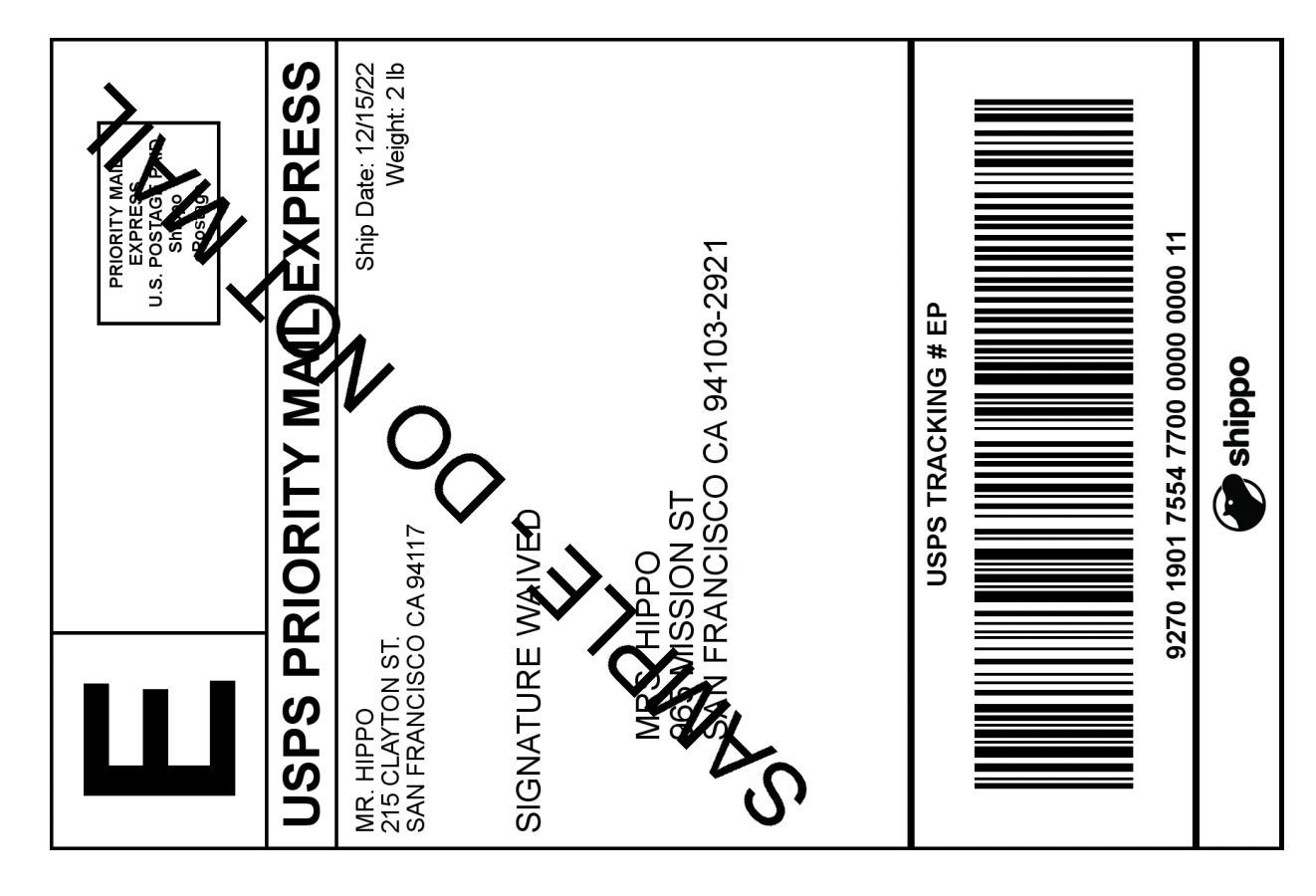
This is a sample of a generated label.
Calling the transactions endpoint `https://api.goshippo.com/transactions`, creates a `transaction` [object](/api-reference/transactions/list-all-shipping-labels) and purchases your shipping label. Use the `object_id` of the `rates` you have chosen from your `shipment`. If your `shipment` has more than one `rates`, select the `object_id` of the rate that works best for you.
You can send an optional `label_file_type` in the transaction call. If you don’t specify this value, the API will use to the default file format, which you can set on the [settings page](https://apps.goshippo.com/settings/account).
**Request:**
```shell title="cURL" theme={null}
curl https://api.goshippo.com/transactions \
-H "Authorization: ShippoToken " \
-d rate="eab0f0c5689347439a9b87f2380710e5"
-d label_file_type="PDF"
-d async=false
```
```Python title="Python" theme={null}
# Get the first rate in the rates results.
# Customize this based on your business logic.
rate = shipment.rates[0]
# Purchase the desired rate.
transaction = shippo_sdk.transactions.create(
components.TransactionCreateRequest(
rate=rate.object_id,
label_file_type=components.LabelFileTypeEnum.PDF,
async_=False
)
)
# Retrieve label url and tracking number or error message
if transaction.status == "SUCCESS":
print(transaction.label_url)
print(transaction.tracking_number)
else:
print(transaction.messages)
```
```PHP title="PHP" theme={null}
// Get the first rate in the rates results.
// Customize this based on your business logic.
$rate = $shipment["rates"][0];
// Purchase the desired rate.
$transaction = Shippo_Transaction::create( array(
'rate' => $rate["object_id"],
'label_file_type' => "PDF",
'async' => false ) );
// Retrieve label url and tracking number or error message
if ($transaction["status"] == "SUCCESS"){
echo( $transaction["label_url"] );
echo("\n");
echo( $transaction["tracking_number"] );
}else {
echo( $transaction["messages"] );
}
```
```typescript title="TypeScript" theme={null}
// Get the first rate in the rates results.
// Customize this based on your business logic.
const rate = shipment.rates[0];
// Purchase the desired rate.
const transaction = await shippo.transactions.create({
rate: rate?.objectId,
labelFileType: LabelFileTypeEnum.Pdf,
async: false
});
```
```Java title="Java" theme={null}
// Get the first rate in the rates results.
// Customize this based on your own business logic
Rate rate = rates.get(0);
Map transactionParameters = new HashMap();
transactionParameters.put("rate", rate.getObjectId());
transactionParameters.put("async", false);
Transaction transaction = Transaction.create(transactionParameters);
if (transaction.getStatus().equals("SUCCESS")) {
System.out.println(String.format("Label url : %s", transaction.getLabelUrl()));
System.out.println(String.format("Tracking number : %s", transaction.getTrackingNumber()));
} else {
System.out.println(String.format("An Error has occured while generating you label. Messages : %s", transaction.getMessages()));
}
```
```cs title="C#" theme={null}
// Get the first rate in the rates results.
// Customize this based on your business logic.
Rate rate = shipment.Rates[0];
Transaction transaction = await sdk.Transactions.CreateAsync(
CreateTransactionRequestBody.CreateTransactionCreateRequest(
new TransactionCreateRequest()
{
Rate = rate.ObjectId,
LabelFileType = LabelFileTypeEnum.Pdf,
Async = false,
}
)
);
if (transaction.Status == TransactionStatusEnum.Success)
{
Console.WriteLine($"{transaction.LabelUrl}");
Console.WriteLine($"{transaction.TrackingNumber}");
}
else
{
Console.WriteLine($"{transaction.Messages}");
}
```
The response is the `transaction` object that includes details about your purchased label including a link to download shipping label (`label_url`).
**Response:**
```json theme={null}
{
"object_state": "VALID",
"status": "SUCCESS",
"object_created": "2022-12-15T11:57:45.631Z",
"object_updated": "2022-12-15T11:57:46.670Z",
"object_id": "2db03e1bc677420a8c56dc77a60e9386",
"object_owner": "shippotle@shippo.com",
"test": true,
"rate": "eab0f0c5689347439a9b87f2380710e5",
"tracking_number": "92701901755477000000000011",
"tracking_status": "UNKNOWN",
"eta": null,
"tracking_url_provider": "https://tools.usps.com/go/TrackConfirmAction_input?origTrackNum=92701901755477000000000011",
"label_url": "https://deliver.goshippo.com/2db03e1bc677420a8c56dc77a60e9386.pdf?Expires=1702641466&Signature=dHAPUFOt7qrqQ-cUI2ptZKwO6rdmXQDu0XZS7gaWO9b77Og5O4yYQDaWuQCQ~otPHczkkI-EPPv20jkf3mTfi4oxdHdUX7W4OURzICPWSyDkP~neuNPDp21q5Wnohf5SBxC300NksR~be4Vdg0DygbWS4-aGDN6tQGuTNIWfUrqFuhzY~2DWEdCljt-XDYQLWxOWPD3sh99FaPvqutC2QRtJxmnxQx-A-CZO6XKeP5JNcCiPjc3Ic~3qbrgVdHnEJH6xmtTP6PBxvipsP0sJdZOp7xYAHOlLx4KHEv0Keah0eEy9lEZLfkSoYo6QOLymWf8TAIQplaYPlRY2yhlihw__&Key-Pair-Id=APKAJRICFXQ2S4YUQRSQ",
"commercial_invoice_url": null,
"messages": [ ],
"order": null,
"metadata": "Order ID",
"parcel": "8c119bb117934dfea19eac1e90230fa5",
"billing": {
"payments": [ ]
},
"qr_code_url": null
}
```
This is a sample of a generated label.
 ## Create a label with one API call
If you already know what service level you’ll be shipping with, you can create a shipping label in one API call through Shippo using our Instalabel feature.
**Note**
Instalabel creation is available only for a select set of carriers through Shippo. To see if your carrier is supported, see our [carrier capabilities](/docs/Carriers/CarrierCapabilities) page.
Creating an Instalabel with one API call is a POST request to the Transaction endpoint with the nested shipment information, the carrier account, and the service token.
Here’s a sample call that instantly creates and returns a shipping label:
**Request:**
```shell title="cURL" theme={null}
curl https://api.goshippo.com/transactions/ \
-H "Authorization: ShippoToken " \
-H "Content-Type: application/json" \
-d '{
"shipment": {
"address_from": {
"name": "Mr. Hippo",
"street1": "215 Clayton St.",
"city": "San Francisco",
"state": "CA",
"zip": "94117",
"country": "US",
"phone": "+1 555 341 9393",
"email": "support@shippo.com"
},
"address_to": {
"name": "Mrs. Hippo",
"street1": "965 Mission St.",
"city": "San Francisco",
"state": "CA",
"zip": "94105",
"country": "US",
"phone": "+1 555 341 9393",
"email": "support@shippo.com"
},
"parcels": [{
"length": "5",
"width": "5",
"height": "5",
"distance_unit": "in",
"weight": "2",
"mass_unit": "lb"
}]
},
"carrier_account": "b741b99f95e841639b54272834bc478c",
"servicelevel_token": "usps_priority"
}'
```
```Python title="Python" theme={null}
import shippo
from shippo.models import components
shippo_sdk = shippo.Shippo(api_key_header="")
address_from = components.AddressCreateRequest(
name="Shawn Ippotle",
company="Shippo",
street1="215 Clayton St.",
city="San Francisco",
state="CA",
zip="94117",
country="US",
phone="+1 555 341 9393",
email="shippotle@shippo.com"
)
address_to = components.AddressCreateRequest(
name="Mr Hippo",
street1="Broadway 1",
city="New York",
state="NY",
zip="10007",
country="US",
phone="+1 555 341 9393",
email="mrhippo@shippo.com",
metadata="Priority Customer"
)
parcel = components.ParcelCreateRequest(
length="5",
width="5",
height="5",
distance_unit=components.DistanceUnitEnum.IN,
weight="2",
mass_unit=components.WeightUnitEnum.LB
)
shipment = components.ShipmentCreateRequest(
address_from=address_from,
address_to=address_to,
parcels=[parcel],
)
transaction = shippo_sdk.transactions.create(
components.InstantTransactionCreateRequest(
shipment=shipment,
carrier_account="b741b99f95e841639b54272834bc478c",
servicelevel_token="usps_priority"
)
)
```
```PHP theme={null}
require_once('lib/Shippo.php');
Shippo::setApiKey("");
$fromAddress = array(
'name' => 'Shawn Ippotle',
'company' => 'Shippo',
'street1' => '215 Clayton St.',
'city' => 'San Francisco',
'state' => 'CA',
'zip' => '94117',
'country' => 'US',
'phone' => '+1 555 341 9393',
'email' => 'shippotle@shippo.com'
);
$toAddress = array(
'name' => 'Mr Hippo"',
'company' => '',
'street1' => 'Broadway 1',
'street2' => '',
'city' => 'New York',
'state' => 'NY',
'zip' => '10007',
'country' => 'US',
'phone' => '+1 555 341 9393',
'email' => 'mrhippo@shippo.com'
);
$parcel = array(
'length'=> '5',
'width'=> '5',
'height'=> '5',
'distance_unit'=> 'in',
'weight'=> '2',
'mass_unit'=> 'lb',
);
$shipment = array(
'address_from'=> $fromAddress,
'address_to'=> $toAddress,
'parcels'=> array($parcel),
);
$transaction = Shippo_Transaction::create( array(
'shipment' => $shipment,
'carrier_account' => 'b741b99f95e841639b54272834bc478c',
'servicelevel_token' => 'usps_priority',
)
);
```
```typescript title="TypeScript" theme={null}
const shippo = new Shippo({apiKeyHeader: ''});
const addressFrom: AddressCreateRequest = {
name: "Shawn Ippotle",
company: "Shippo",
street1: "215 Clayton St.",
city: "San Francisco",
state: "CA",
zip: "94117",
country: "US",
phone: "+1 555 341 9393",
email: "shippotle@shippo.com",
};
const addressTo: AddressCreateRequest = {
name: "Mr Hippo",
company: "",
street1: "Broadway 1",
street2: "",
city: "New York",
state: "NY",
zip: "10007",
country: "US",
phone: "+1 555 341 9393",
email: "mrhippo@shippo.com",
metadata: "Hippos dont lie"
};
const parcel: ParcelCreateRequest = {
length: "5",
width: "5",
height: "5",
distanceUnit: DistanceUnitEnum.In,
weight: "2",
massUnit: WeightUnitEnum.Lb
};
const shipment: ShipmentCreateRequest = {
addressFrom: addressFrom,
addressTo: addressTo,
parcels: [parcel],
};
const transaction = await shippo.transactions.create({
shipment: shipment,
carrierAccount: "078870331023437cb917f5187429b093",
servicelevelToken: ServiceLevelUSPSEnum.UspsPriority.valueOf()
});
```
```Java title="Java" theme={null}
Shippo.setApiKey('');
// To Address
HashMap addressToMap = new HashMap();
addressToMap.put("name", "Mr Hippo");
addressToMap.put("company", "Shippo");
addressToMap.put("street1", "215 Clayton St.");
addressToMap.put("city", "San Francisco");
addressToMap.put("state", "CA");
addressToMap.put("zip", "94117");
addressToMap.put("country", "US");
addressToMap.put("phone", "+1 555 341 9393");
addressToMap.put("email", "mrhippo@goshipppo.com");
// From Address
HashMap addressFromMap = new HashMap();
addressFromMap.put("name", "Ms Hippo");
addressFromMap.put("company", "San Diego Zoo");
addressFromMap.put("street1", "2920 Zoo Drive");
addressFromMap.put("city", "San Diego");
addressFromMap.put("state", "CA");
addressFromMap.put("zip", "92101");
addressFromMap.put("country", "US");
addressFromMap.put("email", "mshippo@goshipppo.com");
addressFromMap.put("phone", "+1 619 231 1515");
addressFromMap.put("metadata", "Customer ID 123456");
// Parcel
HashMap parcelMap = new HashMap();
parcelMap.put("length", "5");
parcelMap.put("width", "5");
parcelMap.put("height", "5");
parcelMap.put("distance_unit", "in");
parcelMap.put("weight", "2");
parcelMap.put("mass_unit", "lb");
// Shipment
HashMap shipmentMap = new HashMap();
shipmentMap.put("address_to", addressToMap);
shipmentMap.put("address_from", addressFromMap);
shipmentMap.put("parcels", parcelMap);
shipmentMap.put("async", false);
// Transaction
HashMap transactionMap = new HashMap();
transactionMap.put("shipment", shipmentMap);
transactionMap.put("servicelevel_token", "usps_priority");
transactionMap.put("carrier_account", "b741b99f95e841639b54272834bc478c");
Transaction transaction = Transaction.create(transactionMap);
if (transaction.getStatus().equals("SUCCESS")) {
System.out.println(String.format("Label url : %s",
transaction.getLabelUrl()));
System.out.println(String.format("Tracking number : %s",
transaction.getTrackingNumber()));
} else {
System.out.println(String.format("An Error has occured while generating your label. Messages : %s",
transaction.getMessages()));
}
```
```cs title="C#" theme={null}
using Shippo;
using Shippo.Models.Components;
ShippoSDK sdk = new ShippoSDK(apiKeyHeader: "");
AddressFrom addressFrom = AddressFrom.CreateAddressCreateRequest(
new AddressCreateRequest()
{
Name = "Shawn Ippotle",
Company = "Shippo",
Street1 = "215 Clayton St.",
City = "San Francisco",
State = "CA",
Zip = "94117",
Country = "US",
Phone = "+1 555 341 9393",
Email = "shippotle@shippo.com",
}
);
AddressTo addressTo = AddressTo.CreateAddressCreateRequest(
new AddressCreateRequest()
{
Name = "Mr Hippo",
Street1 = "Broadway 1",
City = "New York",
State = "NY",
Zip = "10007",
Country = "US",
Phone = "+1 555 341 9393",
Email = "mrhippo@shippo.com",
Metadata = "Priority Customer",
}
);
Shippo.Models.Components.Parcels parcel = Shippo.Models.Components.Parcels.CreateParcelCreateRequest(
new ParcelCreateRequest()
{
Length = "5",
Width = "5",
Height = "5",
DistanceUnit = DistanceUnitEnum.In,
Weight = "2",
MassUnit = WeightUnitEnum.Lb,
}
);
ShipmentCreateRequest shipmentCreateRequest = new ShipmentCreateRequest()
{
AddressFrom = addressFrom,
AddressTo = addressTo,
Parcels = new List() { parcel },
};
Transaction transaction = await sdk.Transactions.CreateAsync(
CreateTransactionRequestBody.CreateInstantTransactionCreateRequest(
new InstantTransactionCreateRequest()
{
Shipment = shipmentCreateRequest,
CarrierAccount = "b741b99f95e841639b54272834bc478c",
ServicelevelToken = ServiceLevelUSPSEnum.UspsPriority.Value(),
}
)
);
```
The response is the `transaction` object that includes details about the label including a link to your shipping label `label_url`. Shippo automatically creates the corresponding `rate` object, which you can use to retrieve the `amount` of the label.
**Response:**
```json theme={null}
{
"object_state": "VALID",
"status": "SUCCESS",
"object_created": "2022-12-27T19:14:48.273Z",
"object_updated": "2022-12-27T19:14:48.273Z",
"object_id": "64bba01845ef40d29374032599f22588",
"object_owner": "shippotle@shippo.com",
"was_test": false,
"rate": {
"object_id": "cf6fea899f1848b494d9568e8266e076",
"amount": "5.50",
"currency": "USD",
"amount_local": "5.50",
"currency_local": "USD",
"provider": "USPS",
"servicelevel_name": "Priority Mail",
"servicelevel_token": "usps_priority",
"carrier_account": "078870331023437cb917f5187429b093",
},
"tracking_number": "ZW70QJC",
"tracking_status": {
"object_created": "2013-12-27T23:17:41.411Z",
"object_id": "a21b3d6831c14ceaba6730179ce6e784",
"status": "UNKNOWN",
"status_details": "",
"status_date": "2022-12-28T12:04:04.214Z"
},
"tracking_url_provider": "https://tools.usps.com/go/TrackConfirmAction.action?tLabels=ZW70QJC",
"eta": "2013-12-30T12:00:00.000Z",
"label_url": "https://shippo-delivery.s3.amazonaws.com/96.pdf?Signature=PEdWrp0mFWAGwJp7FW3b%2FeA2eyY%3D&Expires=1385930652&AWSAccessKeyId=AKIAJTHP3LLFMYAWALIA",
"commercial_invoice_url": "",
"metadata": "",
"messages": []
}
```
## Create a label from selected carriers
Creating a `shipment` will generate rates from all carriers connected with your account (including both Shippo carrier accounts and your own carrier accounts). You can modify your API call to return rates from your selected carriers.
## Create a label with one API call
If you already know what service level you’ll be shipping with, you can create a shipping label in one API call through Shippo using our Instalabel feature.
**Note**
Instalabel creation is available only for a select set of carriers through Shippo. To see if your carrier is supported, see our [carrier capabilities](/docs/Carriers/CarrierCapabilities) page.
Creating an Instalabel with one API call is a POST request to the Transaction endpoint with the nested shipment information, the carrier account, and the service token.
Here’s a sample call that instantly creates and returns a shipping label:
**Request:**
```shell title="cURL" theme={null}
curl https://api.goshippo.com/transactions/ \
-H "Authorization: ShippoToken " \
-H "Content-Type: application/json" \
-d '{
"shipment": {
"address_from": {
"name": "Mr. Hippo",
"street1": "215 Clayton St.",
"city": "San Francisco",
"state": "CA",
"zip": "94117",
"country": "US",
"phone": "+1 555 341 9393",
"email": "support@shippo.com"
},
"address_to": {
"name": "Mrs. Hippo",
"street1": "965 Mission St.",
"city": "San Francisco",
"state": "CA",
"zip": "94105",
"country": "US",
"phone": "+1 555 341 9393",
"email": "support@shippo.com"
},
"parcels": [{
"length": "5",
"width": "5",
"height": "5",
"distance_unit": "in",
"weight": "2",
"mass_unit": "lb"
}]
},
"carrier_account": "b741b99f95e841639b54272834bc478c",
"servicelevel_token": "usps_priority"
}'
```
```Python title="Python" theme={null}
import shippo
from shippo.models import components
shippo_sdk = shippo.Shippo(api_key_header="")
address_from = components.AddressCreateRequest(
name="Shawn Ippotle",
company="Shippo",
street1="215 Clayton St.",
city="San Francisco",
state="CA",
zip="94117",
country="US",
phone="+1 555 341 9393",
email="shippotle@shippo.com"
)
address_to = components.AddressCreateRequest(
name="Mr Hippo",
street1="Broadway 1",
city="New York",
state="NY",
zip="10007",
country="US",
phone="+1 555 341 9393",
email="mrhippo@shippo.com",
metadata="Priority Customer"
)
parcel = components.ParcelCreateRequest(
length="5",
width="5",
height="5",
distance_unit=components.DistanceUnitEnum.IN,
weight="2",
mass_unit=components.WeightUnitEnum.LB
)
shipment = components.ShipmentCreateRequest(
address_from=address_from,
address_to=address_to,
parcels=[parcel],
)
transaction = shippo_sdk.transactions.create(
components.InstantTransactionCreateRequest(
shipment=shipment,
carrier_account="b741b99f95e841639b54272834bc478c",
servicelevel_token="usps_priority"
)
)
```
```PHP theme={null}
require_once('lib/Shippo.php');
Shippo::setApiKey("");
$fromAddress = array(
'name' => 'Shawn Ippotle',
'company' => 'Shippo',
'street1' => '215 Clayton St.',
'city' => 'San Francisco',
'state' => 'CA',
'zip' => '94117',
'country' => 'US',
'phone' => '+1 555 341 9393',
'email' => 'shippotle@shippo.com'
);
$toAddress = array(
'name' => 'Mr Hippo"',
'company' => '',
'street1' => 'Broadway 1',
'street2' => '',
'city' => 'New York',
'state' => 'NY',
'zip' => '10007',
'country' => 'US',
'phone' => '+1 555 341 9393',
'email' => 'mrhippo@shippo.com'
);
$parcel = array(
'length'=> '5',
'width'=> '5',
'height'=> '5',
'distance_unit'=> 'in',
'weight'=> '2',
'mass_unit'=> 'lb',
);
$shipment = array(
'address_from'=> $fromAddress,
'address_to'=> $toAddress,
'parcels'=> array($parcel),
);
$transaction = Shippo_Transaction::create( array(
'shipment' => $shipment,
'carrier_account' => 'b741b99f95e841639b54272834bc478c',
'servicelevel_token' => 'usps_priority',
)
);
```
```typescript title="TypeScript" theme={null}
const shippo = new Shippo({apiKeyHeader: ''});
const addressFrom: AddressCreateRequest = {
name: "Shawn Ippotle",
company: "Shippo",
street1: "215 Clayton St.",
city: "San Francisco",
state: "CA",
zip: "94117",
country: "US",
phone: "+1 555 341 9393",
email: "shippotle@shippo.com",
};
const addressTo: AddressCreateRequest = {
name: "Mr Hippo",
company: "",
street1: "Broadway 1",
street2: "",
city: "New York",
state: "NY",
zip: "10007",
country: "US",
phone: "+1 555 341 9393",
email: "mrhippo@shippo.com",
metadata: "Hippos dont lie"
};
const parcel: ParcelCreateRequest = {
length: "5",
width: "5",
height: "5",
distanceUnit: DistanceUnitEnum.In,
weight: "2",
massUnit: WeightUnitEnum.Lb
};
const shipment: ShipmentCreateRequest = {
addressFrom: addressFrom,
addressTo: addressTo,
parcels: [parcel],
};
const transaction = await shippo.transactions.create({
shipment: shipment,
carrierAccount: "078870331023437cb917f5187429b093",
servicelevelToken: ServiceLevelUSPSEnum.UspsPriority.valueOf()
});
```
```Java title="Java" theme={null}
Shippo.setApiKey('');
// To Address
HashMap addressToMap = new HashMap();
addressToMap.put("name", "Mr Hippo");
addressToMap.put("company", "Shippo");
addressToMap.put("street1", "215 Clayton St.");
addressToMap.put("city", "San Francisco");
addressToMap.put("state", "CA");
addressToMap.put("zip", "94117");
addressToMap.put("country", "US");
addressToMap.put("phone", "+1 555 341 9393");
addressToMap.put("email", "mrhippo@goshipppo.com");
// From Address
HashMap addressFromMap = new HashMap();
addressFromMap.put("name", "Ms Hippo");
addressFromMap.put("company", "San Diego Zoo");
addressFromMap.put("street1", "2920 Zoo Drive");
addressFromMap.put("city", "San Diego");
addressFromMap.put("state", "CA");
addressFromMap.put("zip", "92101");
addressFromMap.put("country", "US");
addressFromMap.put("email", "mshippo@goshipppo.com");
addressFromMap.put("phone", "+1 619 231 1515");
addressFromMap.put("metadata", "Customer ID 123456");
// Parcel
HashMap parcelMap = new HashMap();
parcelMap.put("length", "5");
parcelMap.put("width", "5");
parcelMap.put("height", "5");
parcelMap.put("distance_unit", "in");
parcelMap.put("weight", "2");
parcelMap.put("mass_unit", "lb");
// Shipment
HashMap shipmentMap = new HashMap();
shipmentMap.put("address_to", addressToMap);
shipmentMap.put("address_from", addressFromMap);
shipmentMap.put("parcels", parcelMap);
shipmentMap.put("async", false);
// Transaction
HashMap transactionMap = new HashMap();
transactionMap.put("shipment", shipmentMap);
transactionMap.put("servicelevel_token", "usps_priority");
transactionMap.put("carrier_account", "b741b99f95e841639b54272834bc478c");
Transaction transaction = Transaction.create(transactionMap);
if (transaction.getStatus().equals("SUCCESS")) {
System.out.println(String.format("Label url : %s",
transaction.getLabelUrl()));
System.out.println(String.format("Tracking number : %s",
transaction.getTrackingNumber()));
} else {
System.out.println(String.format("An Error has occured while generating your label. Messages : %s",
transaction.getMessages()));
}
```
```cs title="C#" theme={null}
using Shippo;
using Shippo.Models.Components;
ShippoSDK sdk = new ShippoSDK(apiKeyHeader: "");
AddressFrom addressFrom = AddressFrom.CreateAddressCreateRequest(
new AddressCreateRequest()
{
Name = "Shawn Ippotle",
Company = "Shippo",
Street1 = "215 Clayton St.",
City = "San Francisco",
State = "CA",
Zip = "94117",
Country = "US",
Phone = "+1 555 341 9393",
Email = "shippotle@shippo.com",
}
);
AddressTo addressTo = AddressTo.CreateAddressCreateRequest(
new AddressCreateRequest()
{
Name = "Mr Hippo",
Street1 = "Broadway 1",
City = "New York",
State = "NY",
Zip = "10007",
Country = "US",
Phone = "+1 555 341 9393",
Email = "mrhippo@shippo.com",
Metadata = "Priority Customer",
}
);
Shippo.Models.Components.Parcels parcel = Shippo.Models.Components.Parcels.CreateParcelCreateRequest(
new ParcelCreateRequest()
{
Length = "5",
Width = "5",
Height = "5",
DistanceUnit = DistanceUnitEnum.In,
Weight = "2",
MassUnit = WeightUnitEnum.Lb,
}
);
ShipmentCreateRequest shipmentCreateRequest = new ShipmentCreateRequest()
{
AddressFrom = addressFrom,
AddressTo = addressTo,
Parcels = new List() { parcel },
};
Transaction transaction = await sdk.Transactions.CreateAsync(
CreateTransactionRequestBody.CreateInstantTransactionCreateRequest(
new InstantTransactionCreateRequest()
{
Shipment = shipmentCreateRequest,
CarrierAccount = "b741b99f95e841639b54272834bc478c",
ServicelevelToken = ServiceLevelUSPSEnum.UspsPriority.Value(),
}
)
);
```
The response is the `transaction` object that includes details about the label including a link to your shipping label `label_url`. Shippo automatically creates the corresponding `rate` object, which you can use to retrieve the `amount` of the label.
**Response:**
```json theme={null}
{
"object_state": "VALID",
"status": "SUCCESS",
"object_created": "2022-12-27T19:14:48.273Z",
"object_updated": "2022-12-27T19:14:48.273Z",
"object_id": "64bba01845ef40d29374032599f22588",
"object_owner": "shippotle@shippo.com",
"was_test": false,
"rate": {
"object_id": "cf6fea899f1848b494d9568e8266e076",
"amount": "5.50",
"currency": "USD",
"amount_local": "5.50",
"currency_local": "USD",
"provider": "USPS",
"servicelevel_name": "Priority Mail",
"servicelevel_token": "usps_priority",
"carrier_account": "078870331023437cb917f5187429b093",
},
"tracking_number": "ZW70QJC",
"tracking_status": {
"object_created": "2013-12-27T23:17:41.411Z",
"object_id": "a21b3d6831c14ceaba6730179ce6e784",
"status": "UNKNOWN",
"status_details": "",
"status_date": "2022-12-28T12:04:04.214Z"
},
"tracking_url_provider": "https://tools.usps.com/go/TrackConfirmAction.action?tLabels=ZW70QJC",
"eta": "2013-12-30T12:00:00.000Z",
"label_url": "https://shippo-delivery.s3.amazonaws.com/96.pdf?Signature=PEdWrp0mFWAGwJp7FW3b%2FeA2eyY%3D&Expires=1385930652&AWSAccessKeyId=AKIAJTHP3LLFMYAWALIA",
"commercial_invoice_url": "",
"metadata": "",
"messages": []
}
```
## Create a label from selected carriers
Creating a `shipment` will generate rates from all carriers connected with your account (including both Shippo carrier accounts and your own carrier accounts). You can modify your API call to return rates from your selected carriers.

 Follow our guide on [Rate shopping with carriers](/docs/Shipments/RateShoppingWithCarriers).