

- Your current account keeps working until you switch.
- Revert any time, no support ticket.
How to migrate
The same five steps apply whichever integration you are on today.1
Get your v3 credentials from OnTrac
v3 uses a WSID and WSKey pair, issued by OnTrac per account. This is the long lead item. OnTrac provisions one account at a time and it can take a few weeks, so start this first.
2
Connect a new OnTrac account in Shippo
Use the WSID and WSKey. Leave your existing account connected. The two run side by side, and Shippo routes every label through the account that bought it.
3
Update your integration
Send
extra.fulfillment_center on every shipment, using the code OnTrac issues for each of your warehouses. If you do not already have these codes, request them from OnTrac alongside your credentials. Shippo cannot issue or look them up for you, and without one on the shipment OnTrac returns no rates.
Also request the ontrac_ground service level, and stop sending extras that v3 no longer supports.4
Test, then brief your warehouse
Run rating, label purchase, tracking and cancellation on the new account. Show your warehouse team the new label and test your scanners before you move production traffic.
5
Stop using the old account
If anything looks wrong, switch back. It is a configuration change on your side, not a code deploy.
What changes for you
Select the integration you are on today.- Legacy OnTrac
- LaserShip
These will break your shipments
Work through these before you move production traffic.1. Your credentials change
1. Your credentials change
A WSID and WSKey replace your account number and password. Request them from OnTrac.
2. Every shipment must carry extra.fulfillment_center
2. Every shipment must carry extra.fulfillment_center
This is the OnTrac-issued code for the warehouse the shipment leaves from, and it is required on every rate request and every label purchase. Without it you will not see OnTrac rates at all, so there is no rate to buy a label from.The old API worked out your origin from the account number alone, so you have never had to send this. If you do not have a code for each of your warehouses, ask OnTrac for them. They are issued by OnTrac, and Shippo cannot look them up for you.
3. Cash on delivery is not supported
3. Cash on delivery is not supported
You can ship COD today. OnTrac v3 has no COD equivalent, so the request is rejected with a clear error. You will need to collect payment outside OnTrac.
4. Carrier insurance and declared value are not supported
4. Carrier insurance and declared value are not supported
You can declare a package value for carrier coverage today. OnTrac v3 has no field for it, so the request is rejected with a clear error. Move coverage to a third-party insurer.
5. Third-party billing must name an account
5. Third-party billing must name an account
THIRD_PARTY is the only billing type v3 supports. Any other type is rejected, and so is a third-party request with no account number. If you are not billing a third party, leave billing out entirely and the shipper is billed by default.6. More PO Box formats are caught
6. More PO Box formats are caught
PO Boxes are already blocked today, but the old detection missed some address formats. A small number of shipments that used to slip through will now be rejected.
These change what you and your warehouse see
-
Tracking numbers change format. Update anything that validates or parses the prefix: WMS, OMS, customer notifications, returns portals, analytics.
- The barcode changes. The 2D barcode moves from a PDF417 rectangular matrix to a DataMatrix square. Test your scanners against a v3 label before you migrate a warehouse.
- The label looks different. This is the bigger of the two visual changes. Branding, layout and barcode all change at once. See What the labels look like.
These get better
You can cancel labels. The old integration has no cancel mechanism at all, so refund requests sit in pending refund indefinitely. On v3 you can cancel a label any time before it is loaded onto an OnTrac vehicle. Labels bought on your old account are not covered.
Multi-package shipments work. One tracking number per box, bought in a single transaction. The old integration rejected multi-piece outright.
One account instead of one per warehouse. The account holds your credentials and the fulfillment center code travels on the shipment. A shipper running 49 warehouse accounts today collapses to one.
What the labels look like
Labels you bought before migrating keep their existing format and keep tracking normally.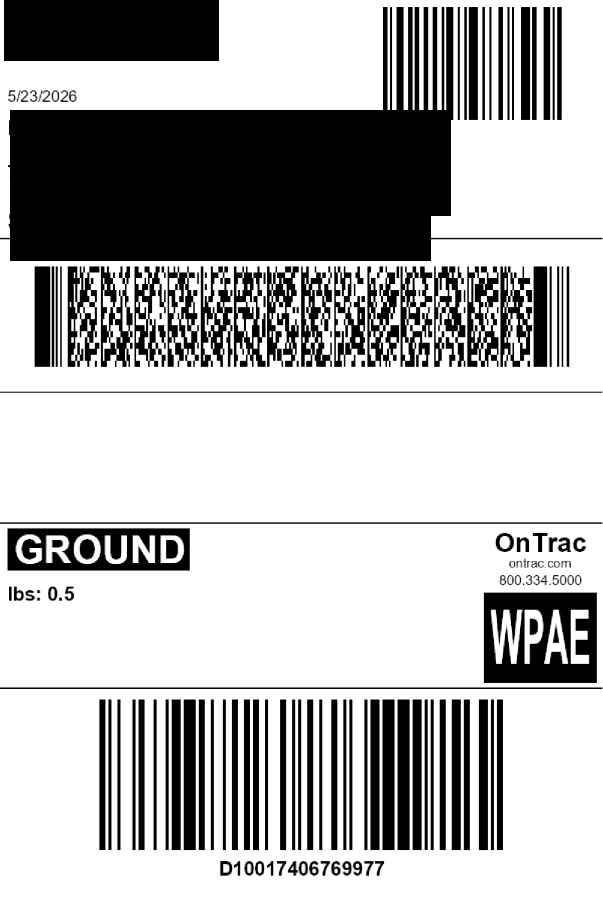
Legacy OnTrac, today
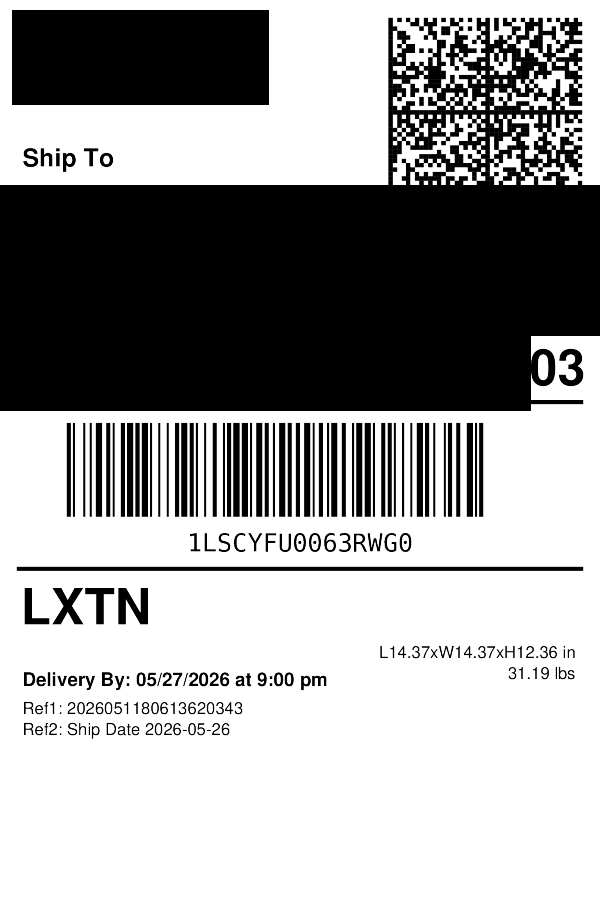
LaserShip, today
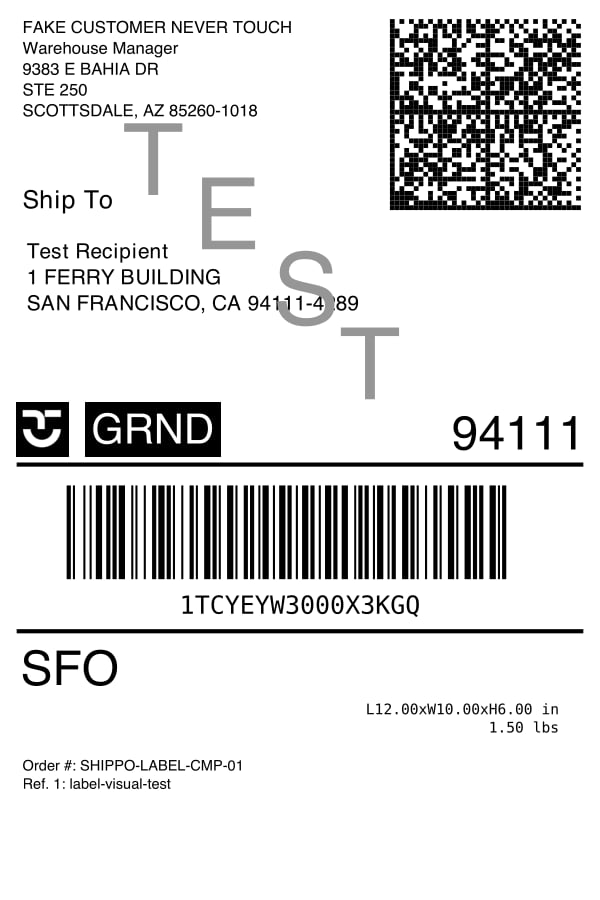
OnTrac v3, after you migrate
Why migrating is worth it
Label cancellations finally work
Label cancellations finally work
Neither legacy integration has a cancel mechanism, so refund requests sit in pending refund indefinitely. On v3 you cancel a label before it is loaded onto an OnTrac vehicle and the refund runs through the normal Shippo flow. For teams with regular order edits or last-minute fulfillment changes, this is the most tangible day-one gain.
More reliable tracking updates
More reliable tracking updates
v3 lets Shippo request tracking for up to 25 tracking numbers in a single call. That batching lets Shippo poll more efficiently and keep updates coming for every tracking number on your account. The size of the improvement will only be clear once accounts have migrated and it can be measured.
Multi-package shipments in one transaction
Multi-package shipments in one transaction
One tracking number per box, bought in a single call.
Account sprawl collapses
Account sprawl collapses
Multi-warehouse shippers run one carrier account and pass the warehouse code per shipment.
Higher size and weight ceilings, on LaserShip accounts
Higher size and weight ceilings, on LaserShip accounts
Up to 150 lb and 72 in, from 50 lb and 42 in today.
Faster setup for new accounts
Faster setup for new accounts
Purchase-ready within 24 hours of OnTrac issuing credentials, with no manual activation.
Before you cut over
- WSID and WSKey issued by OnTrac, in hand
- Fulfillment center code for every origin location, requested from OnTrac if you do not have them, and sent as
extra.fulfillment_centeron every shipment - COD and carrier insurance requests removed from your integration, or label purchases will fail
- Third-party billing payload updated, if you use it
- Anything that parses the tracking number prefix updated
- Warehouse scanners tested against a v3 label
- Warehouse team briefed on the new label
- PO Box volume audited (LaserShip accounts)
- Old account left connected as your rollback path
Questions about your migration go to your Shippo contact. Your OnTrac rep issues the v3 credentials and your fulfillment center codes.