If you would prefer to learn how to create your first shipping label using Postman, see our guide to create your first shipping label using Postman.
Use the Shippo API to programmatically create shipping labels from any supported carrier. Follow this guide to learn how to create your first label. This guide uses Shippo API objects, to learn more about these read our API objects guide.
Before starting this guide, follow the Authentication guide to generate your API Token. In these guides, wherever you see <API_TOKEN>, replace it with you own token.
When learning about and testing the Shippo API, we recommend using the test token. Using your test token means all the calls you make to the Shippo API are free.
There are two ways to create shipping labels with the Shippo API
If you don't know which carrier and service you want to use, use the two API call method. This retrieves all the available rates for your shipment. You can then choose the rate that works best for you before purchasing it.
If you already know which carrier and service you want to use, you can create a label with a single API call directly.
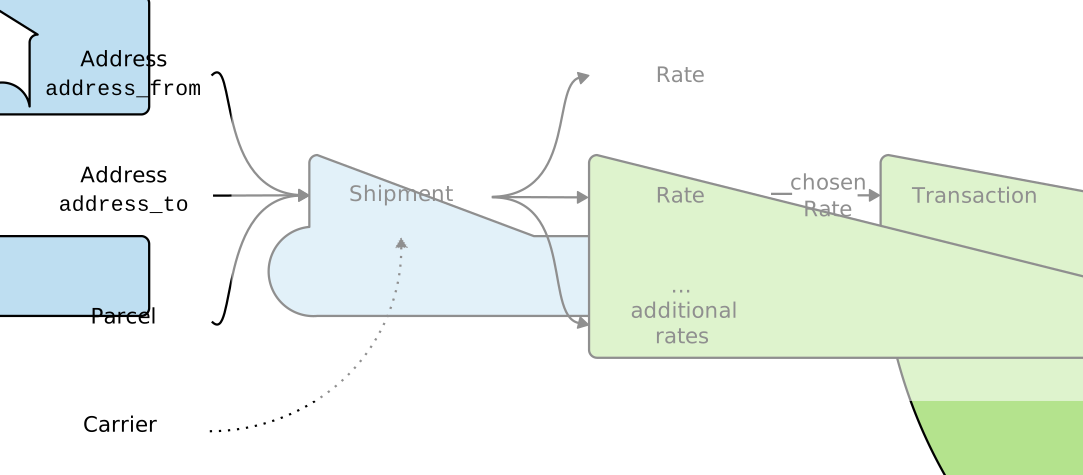
To retrieve all available rates and create a shipping label based on one of the rates, you need to follow two simple steps:
Create the
shipmentobject, consisting of twoaddressobjects (address from and address to) and at least oneparcelsobject (blue objects below). The Shipment response contains the list of available Rates and their associated object IDs.Create the
transactionobject. You pass your chosenratesobject (green object below) to the transaction call. Calling the transaction endpoint purchases your label.
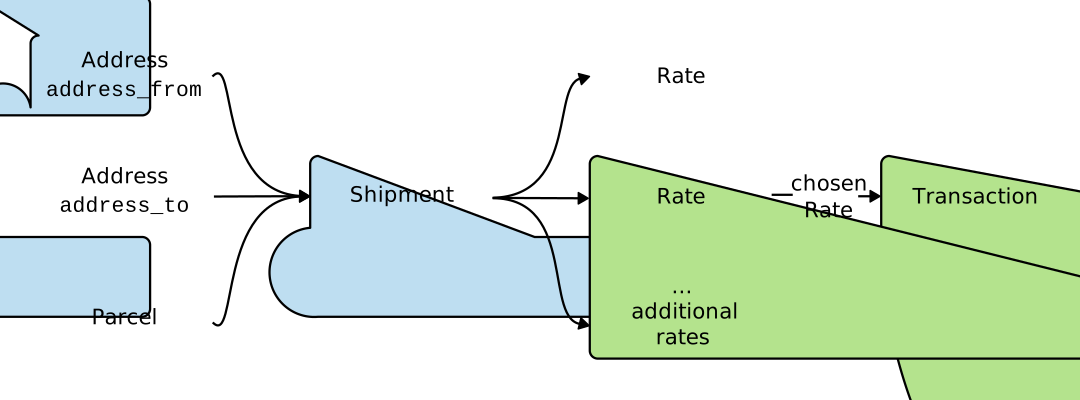

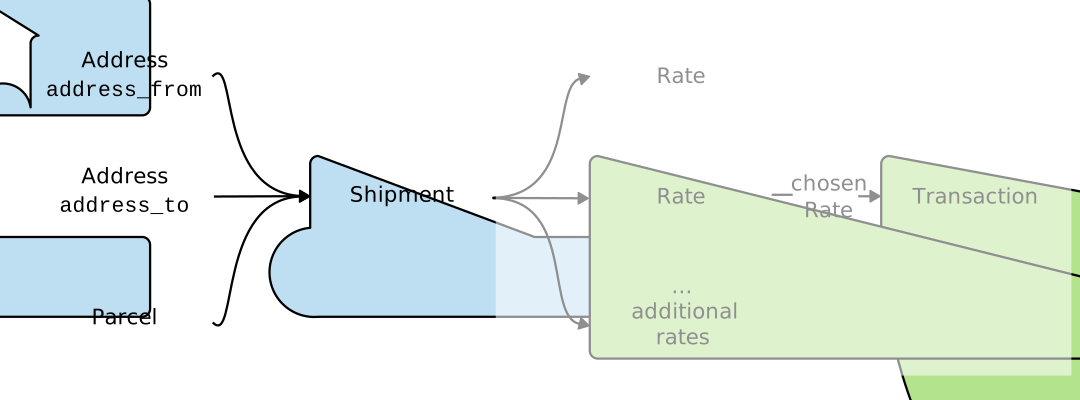 To create a Shipment object, call the shipment endpoint
 https://api.goshippo.com/shipments/.
At a minimum, a shipment requires a address_from, address_to, and parcels.
All US addresses are automatically validated. For more information see our Address Validation guide.
Request:
curl https://api.goshippo.com/shipments/  \
    -H "Authorization: ShippoToken <API_TOKEN>" \
    -H "Content-Type: application/json"  \
    -d '{
       "address_from":{
          "name":"Mr. Hippo",
          "street1":"215 Clayton St.",
          "city":"San Francisco",
          "state":"CA",
          "zip":"94117",
          "country":"US"
       },
       "address_to":{
          "name":"Mrs. Hippo",
          "street1":"965 Mission St.",
          "city":"San Francisco",
          "state":"CA",
          "zip":"94105",
          "country":"US"
       },
       "parcels":[{
          "length":"5",
          "width":"5",
          "height":"5",
          "distance_unit":"in",
          "weight":"2",
          "mass_unit":"lb"
       }],
       "async": false
    }'
The response includes the object_id for the shipment, address_from,address_to, and parcels as well as rates. These rates are the available shipping options for your shipment. Review the returned rates to find the one that works best for your shipment.
Response:
{
   {
  "carrier_accounts": [],
  "object_created": "2022-12-15T11:32:41.707Z",
  "object_updated": "2022-12-15T11:32:41.845Z",
  "object_id": "76ca5cbfd24f4b2d96f38ea6834985be",
  "object_owner": "shippotle@shippo.com",
  "status": "SUCCESS",
  "address_from": {
    "object_id": "e0d64d09edf846d0bd94dda91b299be9",
    "is_complete": true,
    "name": "Mr. Hippo",
    "company": "",
    "street_no": "",
    "street1": "215 Clayton St.",
    "validation_results": {},
    "street2": "",
    "street3": "",
    "city": "San Francisco",
    "state": "CA",
    "zip": "94117",
    "country": "US",
    "phone": "",
    "email": "",
    "is_residential": null,
    "test": true
  },
  "address_to": {
    "object_id": "b2d9219521be4637b5d1baeb70022c33",
    "is_complete": true,
    "name": "Mrs. Hippo",
    "company": "",
    "street_no": "",
    "street1": "965 Mission St.",
    "validation_results": {},
    "street2": "",
    "street3": "",
    "city": "San Francisco",
    "state": "CA",
    "zip": "94105",
    "country": "US",
    "phone": "",
    "email": "",
    "is_residential": null,
    "test": true
  },
  "parcels": [
    {
      "object_state": "VALID",
      "object_created": "2022-12-15T11:32:41.675Z",
      "object_updated": "2022-12-15T11:32:41.741Z",
      "object_id": "8c119bb117934dfea19eac1e90230fa5",
      "object_owner": "shippotle@shippo.com",
      "template": null,
      "extra": {},
      "length": "5.0000",
      "width": "5.0000",
      "height": "5.0000",
      "distance_unit": "in",
      "weight": "2.0000",
      "mass_unit": "lb",
      "value_amount": null,
      "value_currency": null,
      "metadata": "",
      "line_items": [],
      "test": true
    }
  ],
  "shipment_date": "2022-12-15T11:32:41.845Z",
  "address_return": {
    "object_id": "e0d64d09edf846d0bd94dda91b299be9",
    "is_complete": true,
    "name": "Mr. Hippo",
    "company": "",
    "street_no": "",
    "street1": "215 Clayton St.",
    "validation_results": {},
    "street2": "",
    "street3": "",
    "city": "San Francisco",
    "state": "CA",
    "zip": "94117",
    "country": "US",
    "phone": "",
    "email": "",
    "is_residential": null,
    "test": true
  },
  "alternate_address_to": null,
  "customs_declaration": null,
  "extra": {},
  "rates": [
    {
    "object_created": "2022-12-15T11:32:42.044Z",
    "object_id": "eab0f0c5689347439a9b87f2380710e5",
    "object_owner": "shippotle@shippo.com",
    "shipment": "76ca5cbfd24f4b2d96f38ea6834985be",
    "attributes": [ ],
    "amount": "24.30",
    "currency": "USD",
    "amount_local": "24.30",
    "currency_local": "USD",
    "provider": "USPS",
    "provider_image_75": "https://shippo-static.s3.amazonaws.com/providers/75/USPS.png",
    "provider_image_200": "https://shippo-static.s3.amazonaws.com/providers/200/USPS.png",
    "servicelevel": {},
    "estimated_days": 2,
    "arrives_by": null,
    "duration_terms": "Overnight delivery to most U.S. locations.",
    "messages": [ ],
    "carrier_account": "b19e750708384303ac19ca693fe037ce",
    "test": true,
    "zone": "1"
    },
    ...
  ],
  "metadata": "",
  "test": true,
  "order": null
}
    ],
    "carrier_accounts": [],
    "metadata": "Customer ID 123456",
    "messages": []
}
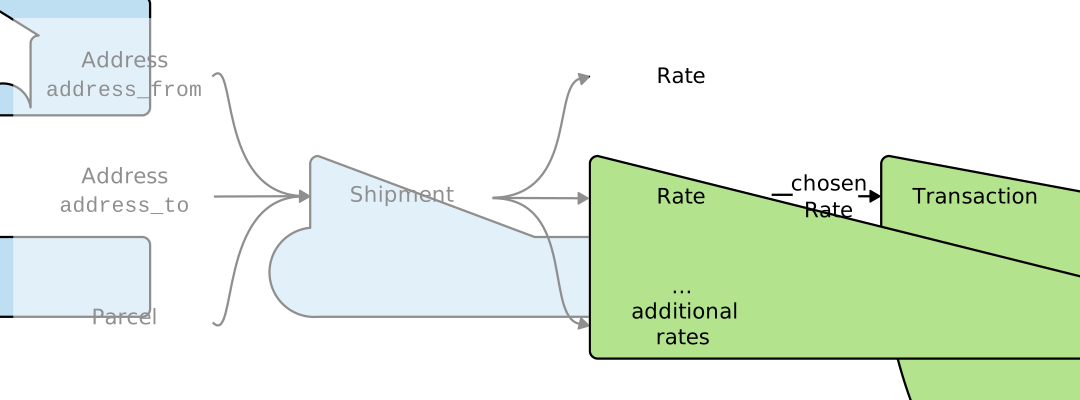
Calling the transactions endpoint https://api.goshippo.com/transactions, creates a transaction object and purchases your shipping label. Use the object_id of the rates you have chosen from your shipment. If your shipment has more than one rates, select the object_id of the rate that works best for you.
You can send an optional label_file_type in the transaction call. If you don’t specify this value, the API will use to the default file format, which you can set on the settings page.
Request:
curl https://api.goshippo.com/transactions \
    -H "Authorization: ShippoToken <API_TOKEN>" \
    -d rate="eab0f0c5689347439a9b87f2380710e5"
    -d label_file_type="PDF"
    -d async=false
The response is the transaction object that includes details about your purchased label including a link to download shipping label (label_url).
Response:
{
    "object_state": "VALID",
    "status": "SUCCESS",
    "object_created": "2022-12-15T11:57:45.631Z",
    "object_updated": "2022-12-15T11:57:46.670Z",
    "object_id": "2db03e1bc677420a8c56dc77a60e9386",
    "object_owner": "shippotle@shippo.com",
    "test": true,
    "rate": "eab0f0c5689347439a9b87f2380710e5",
    "tracking_number": "92701901755477000000000011",
    "tracking_status": "UNKNOWN",
    "eta": null,
    "tracking_url_provider": "https://tools.usps.com/go/TrackConfirmAction_input?origTrackNum=92701901755477000000000011",
    "label_url": "https://deliver.goshippo.com/2db03e1bc677420a8c56dc77a60e9386.pdf?Expires=1702641466&Signature=dHAPUFOt7qrqQ-cUI2ptZKwO6rdmXQDu0XZS7gaWO9b77Og5O4yYQDaWuQCQ~otPHczkkI-EPPv20jkf3mTfi4oxdHdUX7W4OURzICPWSyDkP~neuNPDp21q5Wnohf5SBxC300NksR~be4Vdg0DygbWS4-aGDN6tQGuTNIWfUrqFuhzY~2DWEdCljt-XDYQLWxOWPD3sh99FaPvqutC2QRtJxmnxQx-A-CZO6XKeP5JNcCiPjc3Ic~3qbrgVdHnEJH6xmtTP6PBxvipsP0sJdZOp7xYAHOlLx4KHEv0Keah0eEy9lEZLfkSoYo6QOLymWf8TAIQplaYPlRY2yhlihw__&Key-Pair-Id=APKAJRICFXQ2S4YUQRSQ",
    "commercial_invoice_url": null,
    "messages": [ ],
    "order": null,
    "metadata": "Order ID",
    "parcel": "8c119bb117934dfea19eac1e90230fa5",
    "billing": {
    "payments": [ ]
},
    "qr_code_url": null
}
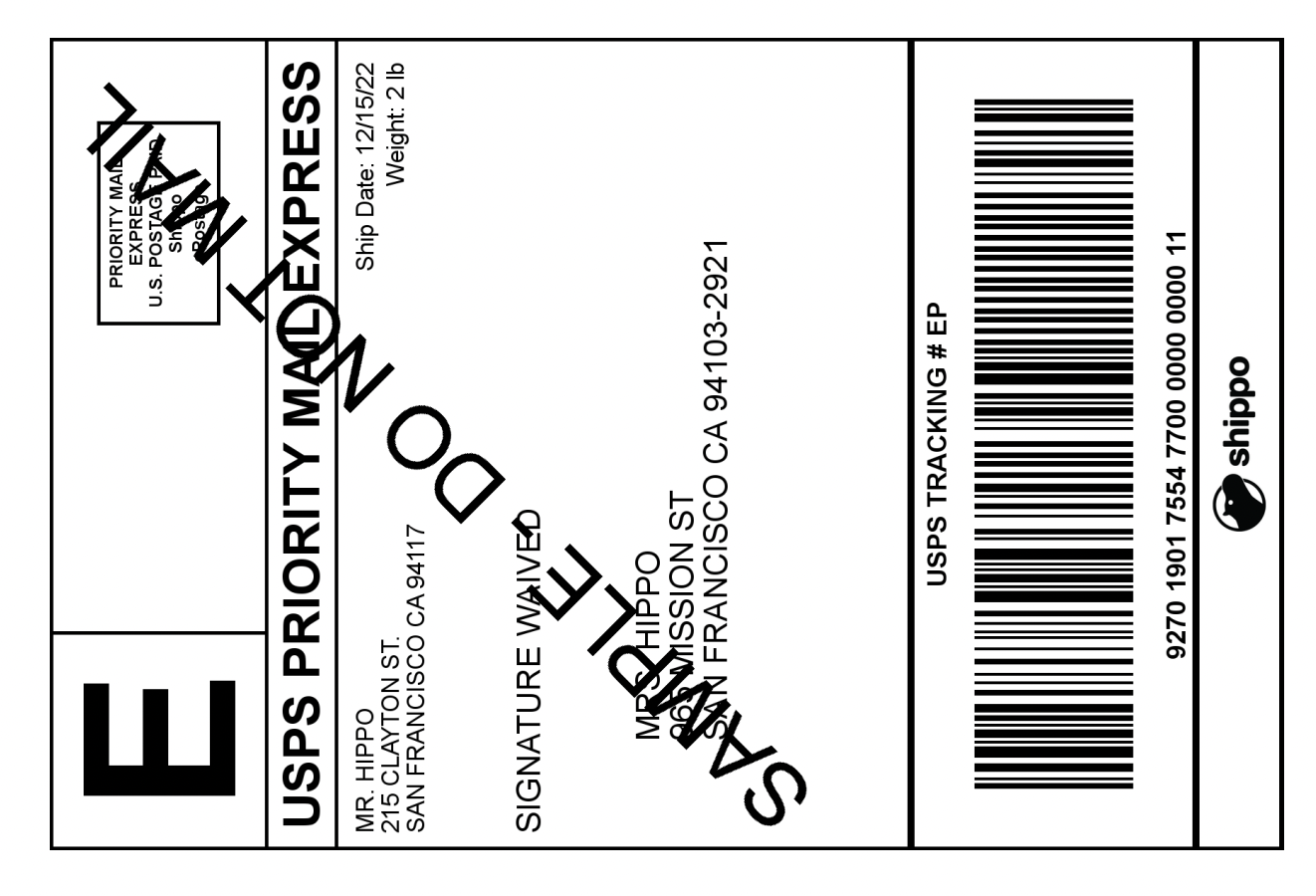
This is a sample of a generated label.
If you already know what service level you’ll be shipping with, you can create a shipping label in one API call through Shippo using our Instalabel feature.
Instalabel creation is available only for a select set of carriers through Shippo. To see if your carrier is supported, see our carrier capabilities page.
Creating an Instalabel with one API call is a POST request to the Transaction endpoint with the nested shipment information, the carrier account, and the service token.
Here’s a sample call that instantly creates and returns a shipping label:
Request:
curl https://api.goshippo.com/transactions/  \
    -H "Authorization: ShippoToken <API_Token>" \
    -H "Content-Type: application/json"  \
    -d '{
        "shipment": {
            "address_from": {
                "name": "Mr. Hippo",
                "street1": "215 Clayton St.",
                "city": "San Francisco",
                "state": "CA",
                "zip": "94117",
                "country": "US",
                "phone": "+1 555 341 9393",
                "email": "support@shippo.com"
            },
            "address_to": {
                "name": "Mrs. Hippo",
                "street1": "965 Mission St.",
                "city": "San Francisco",
                "state": "CA",
                "zip": "94105",
                "country": "US",
                "phone": "+1 555 341 9393",
                "email": "support@shippo.com"
            },
            "parcels": [{
                "length": "5",
                "width": "5",
                "height": "5",
                "distance_unit": "in",
                "weight": "2",
                "mass_unit": "lb"
            }]
        },
        "carrier_account": "b741b99f95e841639b54272834bc478c",
        "servicelevel_token": "usps_priority"
        }'
The response is the transaction object that includes details about the label including a link to your shipping label label_url. Shippo automatically creates the corresponding rate object, which you can use to retrieve the amount of the label.
Response:
{
    "object_state": "VALID",
    "status": "SUCCESS",
    "object_created": "2022-12-27T19:14:48.273Z",
    "object_updated": "2022-12-27T19:14:48.273Z",
    "object_id": "64bba01845ef40d29374032599f22588",
    "object_owner": "shippotle@shippo.com",
    "was_test": false,
    "rate": {
        "object_id": "cf6fea899f1848b494d9568e8266e076",
        "amount": "5.50",
        "currency": "USD",
        "amount_local": "5.50",
        "currency_local": "USD",
        "provider": "USPS",
        "servicelevel_name": "Priority Mail",
        "servicelevel_token": "usps_priority",
        "carrier_account": "078870331023437cb917f5187429b093",
    },
    "tracking_number": "ZW70QJC",
    "tracking_status": {
        "object_created": "2013-12-27T23:17:41.411Z",
        "object_id": "a21b3d6831c14ceaba6730179ce6e784",
        "status": "UNKNOWN",
        "status_details": "",
        "status_date": "2022-12-28T12:04:04.214Z"
    },
    "tracking_url_provider": "https://tools.usps.com/go/TrackConfirmAction.action?tLabels=ZW70QJC",
    "eta": "2013-12-30T12:00:00.000Z",
    "label_url": "https://shippo-delivery.s3.amazonaws.com/96.pdf?Signature=PEdWrp0mFWAGwJp7FW3b%2FeA2eyY%3D&Expires=1385930652&AWSAccessKeyId=AKIAJTHP3LLFMYAWALIA",
    "commercial_invoice_url": "",
    "metadata": "",
    "messages": []
}
Creating a shipment will generate rates from all carriers connected with your account (including both Shippo carrier accounts and your own carrier accounts). You can modify your API call to return rates from your selected carriers.
Follow our guide on Rate shopping with carriers.